
Context
I have a report with 40+ tabs. The email subscription failed. First, we increased the subscription timeout from 1,800 (default value) to 3,600 (seconds), which still failed. Then I increased subscription timeout from 3,600 to 7,200, but the subscription background job still failed at 3,600 seconds.
The subscription timeout for background task was 3,600 even though the subscription.timeout value was set to 7,200 because:
- backgrounder.timeout.single_subscription_notify + backgrounder.extra_timeout_in_seconds is the total timeout for subscription jobs.
- backgrounder.querylimit also controls the total timeout for a subscription job, and subscriptions.timeout controls the per-view timeout.
- of all the above settings, whichever one gets hit first is the one that will cut the job short.
As we verified the timeout values for “backgrounder.extra_timeout_in_seconds” was 1,800 and “backgrounder.timeout.single_subscription_notify” was also 1,800, the sum of these parameters gave us 3600, since the lowest timeout out of the three conditions above is met, we could see that the task was timing out at 3,600.
We should be good to increase the time out value for backgrounder.timeout.single_subscription_notify to 5,400, which would match the timeout set for subscriptions.timeout previously 7,200. If this is still not long enough, we can increase subscriptions.timeout and backgrounder.timeout.single_subscription_notify again.
How to change background process timeout?
TSM is used to manage installation and configuration of Tableau Server. To learn more about TSM, see https://help.tableau.com/current/server-linux/en-us/tsm_overview.htm.
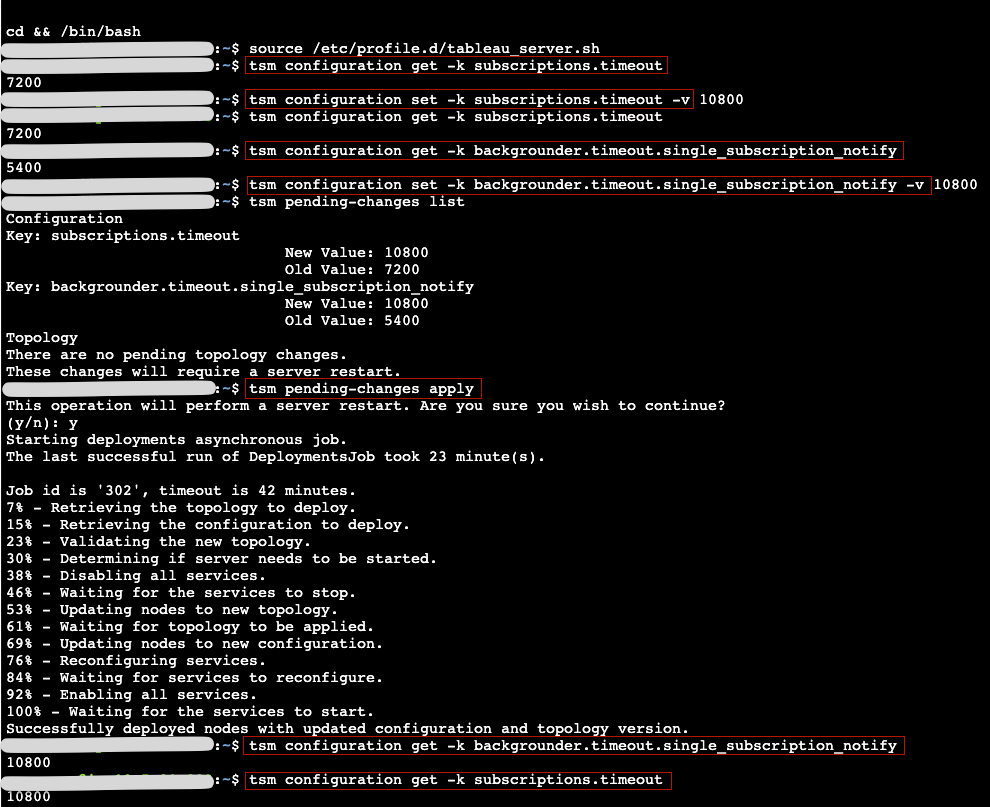
Remember to run source /etc/profile.d/tableau_server.sh first or you may get an error stating that it is not found.
Command lines for reference:
Tableau documentation: https://help.tableau.com/current/server/en-us/cli_configuration-set_tsm.htm#backgroundertimeouttasks
Subscriptions.timeout
Check the current value: tsm configuration get -k subscriptions.timeout
Change the value: tsm configuration set -k subscriptions.timeout -v $VALUE.
backgrounder.timeout.single_subscription_notify
Check the current value: tsm configuration get -k backgrounder.timeout.single_subscription_notify
Change the value: tsm configuration set -k backgrounder.timeout.single_subscription_notify -v $VALUE
backgrounder.extra_timeout_in_seconds
Check the current value: tsm configuration get -k backgrounder.extra_timeout_in_seconds
backgrounder.querylimit
Check the current value: tsm configuration get -k backgrounder.querylimit
Check the pending changes: tsm pending changes list
Apply the changes: tsm pending-changes apply. It will ask you to restart the Tableau server.
 NIKKI YU